Zip Manual
data acquisition access control actuator lighting security home automation free to use
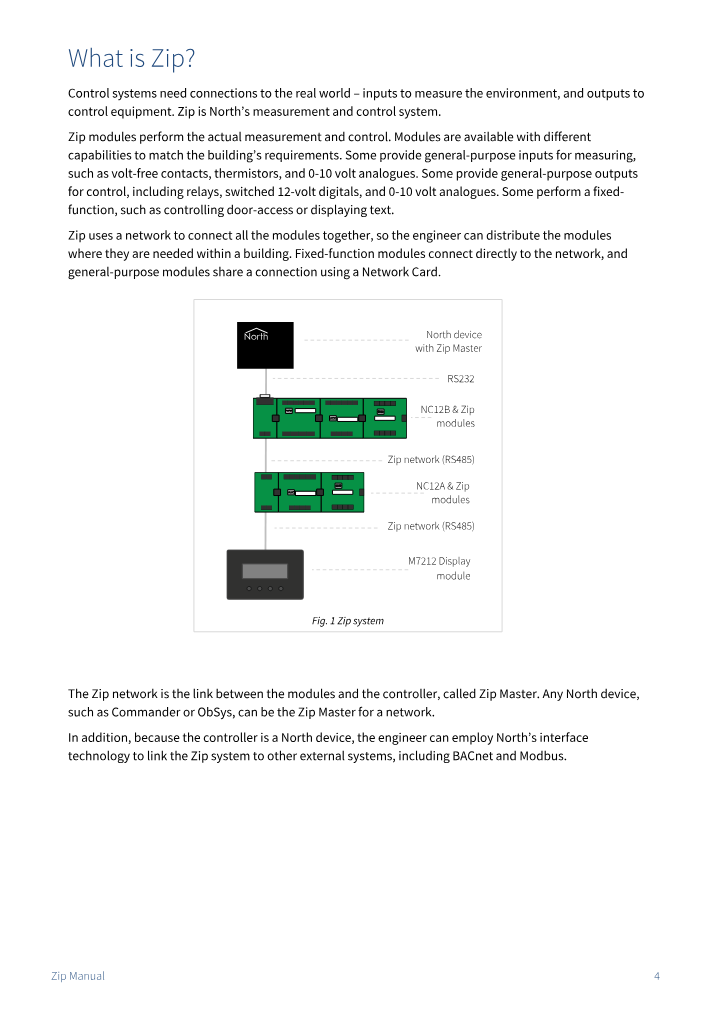
Control systems need connections to the real world – inputs to measure the environment and outputs to control equipment. Zip is North’s measurement and control system.
Driver documentation
The extract below from the North documentation shows compatible equipment, available values, and prerequisites.
Download the full document: Zip Manual (PDF, 80 pages).

Technical summary
| Driver version | ZIPMaster v12 |
|---|---|
| Physical connection | RS232 |
| Interface licence | Free to use Starting the driver does not require an interface licence. |
| Available on Commander | Factory installed Firmware updates available via cloud update and included with ObSys engineering software. |
| Available on ObSys |
Software
ObSys engineering software
ObSys Setup provides a complete toolkit for configuring the ZIPMaster driver, including firmware updates, drivers, and documentation.
ObSys released July 2026 (130 MB)
Download ObSys Setup
How to guides & tips
Version history
Build 2025.08.08
Updated to add support for the new M7212A and M7213A modules.
Build 2024.02.01
Updated with additional network diagnostics.
Build 2022.11.18
Updated to improve start-up, including faster detection of connected modules.
Build 2022.09.01
Updated to support the new M7007 module.
Build 2021.06.17
Support for new M7005 module.
Thermistor value conversion range extended to -50…150 °C.
Offline configuration of an M7004 module: fixed an issue that caused universal outputs (UOx) to wipe when connected.
M7202 display: resolved issue of bi-directional values writing on a restart, even though adjust set to ‘no’.
Build 2019.06.01
New version
Pre-engineering a Zip System
With this new ZipMaster driver, it is now possible to engineer a Zip system before the physical network is available.
Using the Module Types Setup object, the engineer can specify the module type to expect at each address (without the physical module being connected). When the Zip System is scanned, the modules appear. Great for pre-engineering.
Saving the Zip Setup and Zip System objects will save the module types as well as the individual module settings for each address. The backup file(s) can be loaded into a Zip interface elsewhere, even if no modules are physically attached to the new Zip network.
Module lock
Get better control of what happens when a new module is physically added, replaced with another of the same type, or changed for a module of a different type on the Zip network. Use the new Module Lock object to protect against unwanted changes.
Getting help
Whether you have a specific driver query, a question about a North device, or are simply looking for general advice on how our products can help your project, our team is here to assist.
Get in touch. We are always happy to help.